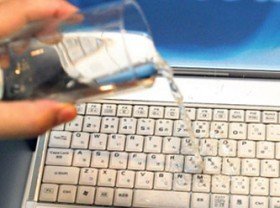
The first version of this article, from 2013, said: unplug, pull the battery, turn it over, dry it, switch it on. As a rough skeleton that was fair for that time. Today most laptop computers are thin, the battery is fixed, and the port is USB-C. The bag of rice is still doing the rounds. So is the hairdryer. Neither saves the board. Both can add damage. Here I write the current, correct order for the workshop and for home. I do not promise a miracle. Cutting power, drying, and staying away from moisture are still the first minutes that help most.
Turning it on while it is wet to see if it still works is often the moment the real damage is done. Short circuits and corrosion form while electricity is present. Power is cut first. Opening it to save a file can lose both the board and the file.
The first minute
- Hold the power button. Do not go to the Windows or macOS shutdown menu. Every second of electricity works on wet copper. Holding 5-10 seconds turns most boards off.
- Unplug the charger and the cables. Pull the adapter, USB sticks, HDMI, the SD card, and the external disk. If a cable is in a wet USB-C port, pull that first. Some newer MacBooks show a liquid alert on the port. Do not charge while that alert is up.
- If your feet are in water, or the device shows smoke / smell / swelling, do not touch it. Cut power at the breaker. If a lithium battery swells, heats up, or smells, stay back. This is not a home repair.
On an older thick laptop, if there is a sliding, user-accessible battery and you know how it comes out, remove it. On most thin laptops after 2016 the battery is inside, held with screws and adhesive. Forcing the cover with a screwdriver puts both the warranty and the cell at risk. If you cannot remove it, do not force it. Cutting power still helps.
Drain the liquid
Open the lid to about a right angle and set it in a tent / inverted V, keyboard facing down. Rest it on a towel or a dry cloth. Gravity should pull the liquid away from the motherboard and out through the key gaps. A light shake can carry liquid into a dry area.
Wipe visible wetness with a lint-free cloth. Do not rub. Do not push tissue, a cotton bud, or a toothpick into a port. Official warnings from some brands say the same: a foreign object crushes the pins, and a grain of rice enters the port.
Do not do this
| What is done | Why it is harmful |
|---|---|
| A bag of rice | It does not pull moisture from inside. Dust and starch enter ports and keys. It is not recommended. |
| Hairdryer, radiator, oven | Pushes liquid inward, warps plastic, speeds corrosion. |
| Power on at once to test | A short on a wet board. This is the most expensive mistake. |
| Compressed air, vacuum | Drives the droplet deeper. |
| Opening a sealed cover at home | Battery, screws, cable. If you are not trained, use a shop. |
Water, coffee and cola are not the same
Clean water still conducts and still does enough harm. Coffee, tea, cola, fruit juice and salt water are worse. Sugar and salt leave a conductive film as they dry. Corrosion can move in hours. With these liquids, saying I will wait 48 hours at home may not be enough. Going early to an authorised shop or a repairer you know buys time to clean the board ultrasonically. Washing a motherboard with isopropyl alcohol at home is trained work. It cannot be left to a student or to someone with a random screwdriver.
Write down what spilled. It helps the shop and insurance. A photo can stay too. Passwords and private data on the screen should not be visible.
How long do you wait?
Looking dry on the outside does not mean the inside is dry. In an airy room at room temperature, in the tent position, at least 48-72 hours is recommended. These times are not magic numbers. With coffee and fizzy drinks, waiting can bake the sugar onto the board. Then the need is not to wait, but to take it to a shop.
While you wait, do not plug in the charger. Do not press the power button. Do not press the keys and spread the liquid.
Do this / do not do this
- Do: Cut power, unplug the cables, put it in the tent position, wait or go to a shop.
- Do: If it is coffee / cola, think of going to a shop early.
- Do: Always keep an important file in a second place, as a backup. Do not try to recover files while it is wet.
- Do not: Rice, hairdryer, oven, shaking, putting an object into a port.
- Do not: Charging a swollen cell or puncturing it at home.
Note: This content is for information. It does not replace the manufacturer guide, authorised service, or official instructions. Liquid damage is not covered by most standard warranties.
Quick checklist
- Is power cut? Are the charger and cables out?
- Swelling, smell, smoke? If yes, did I stay back?
- Is it draining in the tent position? Did I avoid shaking?
- Did I stay away from rice and heat?
- If it was coffee or fizzy drink, did I not delay the shop?
- Did I avoid turning it on while wet?
The board does not always survive. The right order grows the chance. The wrong myth shrinks the chance. Cut power, drain, do not rush.